

What is NEGA?
NEGA is an advanced forensic software developed for the analysis and comparison of digital images in the field of handwriting analysis and document examination. With over a decade of development and wide adoption by professional forensic experts worldwide, NEGA offers a variety of sophisticated tools for graphometry, image comparison, precise length measurement, and more.
Its ability to calibrate images, compare them accurately, and perform detailed analysis makes it an invaluable tool for forensic investigations across a wide range of jurisdictions, from the United States and Europe to Latin America and Asia.
Many of its analysis tools can be highly useful for other sectors such as graphology, criminology, ballistics, medicine, and more.
How can NEGA help me in my work?
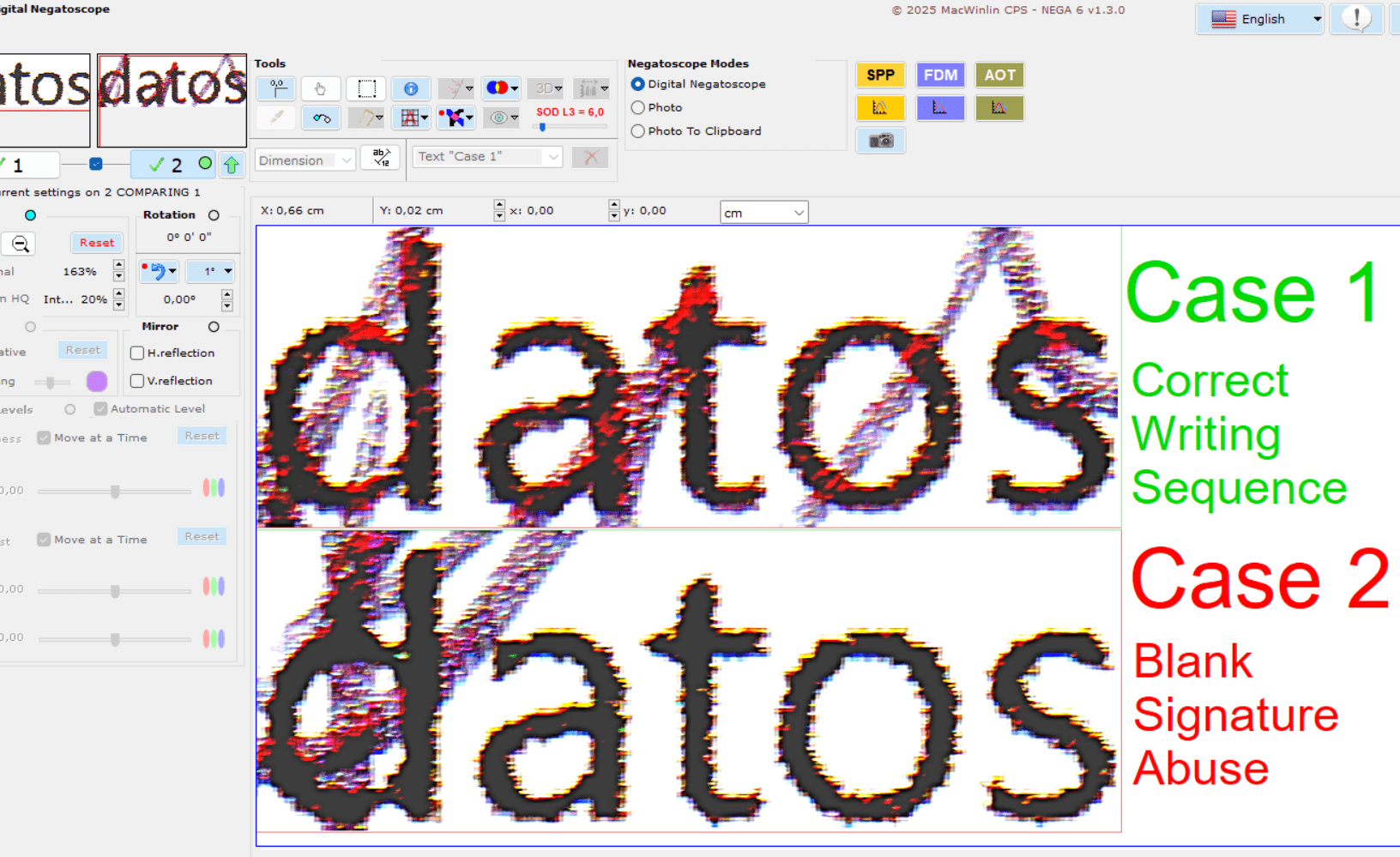
SOD (Stroke Overprint Detection) Digital Filter
This filter allows to detect ink loads from pen strokes that overwrite a printed text, this describes a normal situation of the writing sequence, where first a text is printed from the document, and then signed on top of it.
If the opposite happens, and no ink loads are detected over the text, but the text itself overwrites the pen strokes, then it is a blank signature abuse.
Different filter levels can be applied depending image quality. It is always better, to digitize the document with an optical scanner, with a resolution of 1200 dpi.
SVF (Smart ViewFinder) Digital Filter
This new filter, is used to detect the upper stroke on a crossing strokes. It is based on the ink load, which always marks the direction of the upper stroke, it is a method demonstrated in studies on images taken with laser confocal microscopes, in which this phenomenon is appreciated. The SVF filter has a slider, to regulate the level , this improves the image according to the ink intensity, allowing to better appreciate the ink load, which always occurs just in the upper stroke direction, on the strokes crossing area. The filter is useful in blue inks, for black ink and other colors it is not effective, especially it works well in ballpoint pens, with oil-based and water-based gel inks, although in water-based ink, if it is very fluid lose effectiveness.
SPP (Signature Phase Proportions)
When we sign we always keep a proportionality between the measures of the strokes (Phases), a forger cannot keep this characteristic, it can trace the signature, but then the proportion of all the Phases will be the same in both signatures, so we will know that it is traced . There will always be a small deviation between the proportions of the same Phase and the other of a Firm, of the same person, but it will be minimal and we can analyze and measure each Phase with this new tool in a precise and reliable way.
AOT (Analysis Oval Text)
The AOT (Analysis Oval Text) tool in NEGA Software is specifically designed for the detailed analysis of ovals in the context of handwriting examination and forensic document analysis. AOT enables experts to accurately evaluate the ovals found in handwritten text, such as the letters “o,” “a,” “e,” and other oval shapes, providing advanced metrics to determine similarities, patterns, and potential discrepancies.
FDM (Fibonacci Digital Modeller)
A signature, is a natural and spontaneous representation that identifies us, is a scientifically tested biometric recognition element, like a fingerprint, iris of the eye, or a voice sound. The same person, does’t sign the same thing forever, if we find two identical signatures, it is certain that one of them is a forgery, which is that the signatures of the same person, retain a high proportion of proportional similarity in the around signature borders, although not totally the same handwriting exactely, without taking into account the size of it. To calculate this percentage, a method based on the Fibonacci fan, which is formed from the Fibonacci spiral, has been devised, the algorithm calculates the quadrants around Fibonacci spiral, based on the golden ratio, maintained by the elements of the Fibonacci succession. This method is based on the external and perimeter of the signature shape, and can be used even in signatures from photocopies, regardless of color, because is based on the strokes.
How to position points manually in FDM
In some cases like the video, we have a signature and rubber stamp mixed as well as a printed text or lines, can lead to errors in the points position, as some points may be in zones thatn don’t belong to the signature strokes. In this case you have to position manually, following the one color code, towards the strokes that are in the same quadrant.
Zoom HQ
We are accustomed to seeing in many computer applications for photo retouching, zooms that visualize pixelation in the image when it is greatly expanded. In NEGA forget about this problem, simply choose the zoom HQ mode, and the pixelation disappears.
Calibrate and measure lengths accurately
An element that professionals value, is to be able to measure any digitalized image with precision, NEGA has a quick and simple system to be able to calibrate any image, provided a benchmark has been inserted before digitizing the document. Once the image is calibrated, it can be measured in millimeters, centimeters and pixels.
Collate
The main target in an analysis is to collate the images, to see differences in their envelop borders, NEGA allows to do this simply by activating a selector, then filters, displacements, rotations etc. can be applied to each of the images or two at a time. Also, when the collation mode is activated, the collation filters are activated, this allows you to visualize the images in different ways, depending on the case, we will be more interested in a transparency at 100%, or at 50%, you also have possibility to apply a filter to differentiate or to add the images in color or in black and white, to put one on the other or the reverse without transparency. It’s easy, you just have to go try it and so choose what suits you.
Move and Rotate
It is fundamental a fast system to be able to position each image accurately, in NEGA you have to guide you by your intuition, to move an image, first select the button 1 or 2, and move it, that easy.
To move the image, you have the hand that allows you to drag the selected image, the scroll bars, horizontal or vertical, or for more precision a few buttons that increase or decrease the coordinates in both axes. If you are in collation mode, and you want to move both at once, you have a selection box to do it, activate it and that’s it. You can not ask for more.
To Rotate the image, you can rotate in most popular fixed quadrants of 0º, 90º, 45º, 135º, 180º, 225º, 270º and 315º. And then you can rotate from any position, with more precision, using a few buttons, you can select the rotation interval in degrees that will be applied, for each press, according to the precision you want, by default is selected rotate in 1º, but you have from 0.01 º up to 30º.
Currently is used by forensic experts in the Spain, France, United Kingdom, Ireland, Dominican Republic, Puerto Rico, Costa Rica, Panama, Colombia, Ecuador, Peru, Bolivia, Paraguay, Brazil, Uruguay, Argentina, Chile, Mexico, United States, Hawaii (USA), Canada, Turkey, Slovenia, South Africa, Hong Kong, Malaysia, Saudi Arabia.

What does Acpc mean?
They are the acronym of an association of experts in handwriting analysis and documentscopy, collaborate in the final development to empirically verify the results, with real cases.
Legal Certificate on the functionality NEGA software.
(Issued by the association according to the empirical tests carried out, this is a protected document with watermark, if you want the original version, you have to request it by email)
Asociación Colegial Judicial de Peritos Calígrafos Científicos Documentólogos
National Registry of Associations of the Ministry of Interior, Group 1, section 1ª, National Number 604353. Certifies that the software fulfills the requirements that make it, an optimal tool for the technical / scientific analysis in calligraphic skills and forensic analysis of documents, Certifying the suitability and guarantee of scientific technical functionality.
https://colegioperitoscaligrafos.org/
Why NEGA is special?
Currently there is no specific application for graphic analysis of handwriting texts and documents, analyzes are being done with tools for retouching and photographic treatment and not forensic sciences, this circumstance can distort, deform the real image of study, giving results not authentic for forensic science. NEGA has been designed for non graphical informatics experts, with all the reliability in that the image, and the results are real without alterations, with the maximum simplicity of use and very intuitive commands, the ample aids have been avoided, and it has been replaced by a guide fast to use, commands are not duplicated in pop-down menus, and has been oriented to the use of graphical buttons and intuitive selectors, another problem that has been avoided are the technical parameters to configure the filters and tools, have been automated to the maximum, We have adapted to be more efficient in analysis of manual writing and texts. NEGA increases the speed of work and its results are professional.